
SpeedFlash 22.0.3 - Google Play
You'll be able to see results in few seconds.
Publisher Description



Enjoy millions of the latest Android apps, games, music, movies, TV, books, magazines & more. Anytime, anywhere, across your devices.
Flash Networks KPI tool.
Compare download, upload and browsing speed between Optimized and Bypass conditions.
General:
• The screen always on, no need to change android settings.
• Send results by email.
• Added test name option, will be updated at the end of each test to make sure we will have new file names.
• Portrait only application.
• Warmup all urls before test cycles.
• SpeedFlash folder structure:
o _tmp – downloaded files.
o results:
download
• bypass – xml files
• optimize – xml files
• csv – bypass and optimize results in the same file
upload
• bypass – xml files
• optimize – xml files
• csv – bypass and optimize results in the same file
web
• bypass – xml files
• optimize – xml files
• csv – bypass and optimize results in the same file
o kpi-download – add here your download test’s configuration file (list of URLs).
o kpi-upload - add here your upload test’s configuration file (list of URLs).
o kpi-web - add here your web test’s configuration file (list of URLs).
• New amazing UI and animations.
• Reports options:
o CSV – for now all tests.
o XML – for now web and download test only.
Download:
• Read download urls from file (from “kpi-download” folder). Each line is a cycle.
• Run optimize and bypass test on the same test. Just add ; between 2 urls in the same line. First url is for optimized and the second for bypass.
• Added new option to set test name – this name will be the result file name.
• Test settings can be opened via the settings button on screen. The options we can set:
o Repeat URL: Download the same url per cycle.
o Timeout URL: Timeout between downloads (same url).
o Repeat cycle: Number of cycles.
o Interval cycle: Timeout between cycles.
• Test results:
o You can see the results online on the screen.
ID – The current line in test file. Start from 0.
Optimized – Download time in seconds for the optimize url.
Bypass – Download time in seconds for the bypass url.
Diff – Calculated difference between optimized and bypass results.
Average – Total average results per test.
Min/Max – Minimum and maximum result per test.
o You can find CSV file with the results in the results folder under “download/csv”.
o XML report will be available in the results folder under “download/optimize” and “download/bypass”.
Upload:
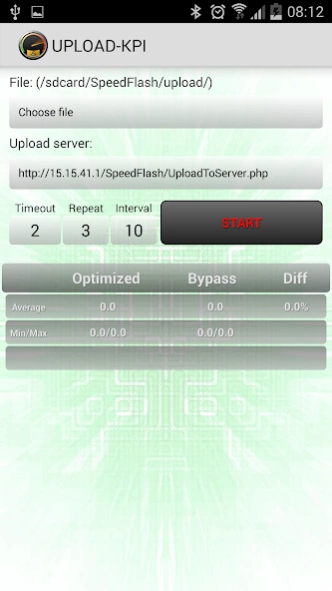
Upload mode will be updated next time. For now it can:
• Choose a file to upload from “kpi-upload” folder.
• Select and upload url to upload the file.
• The settings we can set:
o Timeout: Timeout between uploads.
o Repeat: number of cycles.
o Interval: Timeout between cycles..
Web:
• Read urls from file (from “kpi-web” folder). Each line is a cycle.
• Added new option to set test name – this name will be the result file name.
• Test settings can be opened via the settings button on screen. The options we can set:
o Repeat URL: Download the same url per cycle.
o Url timeout: Timeout between downloads (same url).
o Repeat Cycles: Number of cycles.
o Cycle timeout: Timeout between cycles.
• Test results:
o You can see the results online on the screen.
ID – The current line in test file. Start from 0.
Load time – Webpage load time in seconds.
TX –transmitted KB
RX – received KB
Total – sum of all loadtime, tx and rx results.
o You can find CSV file with the results in the results folder under “web/csv”.
o XML report will be available in the results folder under “web/optimize” and “web/bypass”.
Speed Flash,
Flash Networks
About SpeedFlash 2
The company that develops SpeedFlash 2 is Pilotx. The latest version released by its developer is 2.0.3.
To install SpeedFlash 2 on your Android device, just click the green Continue To App button above to start the installation process. The app is listed on our website since 2014-04-22 and was downloaded 0 times. We have already checked if the download link is safe, however for your own protection we recommend that you scan the downloaded app with your antivirus. Your antivirus may detect the SpeedFlash 2 as malware as malware if the download link to com.koby.speedflash is broken.
How to install SpeedFlash 2 on your Android device:
- Click on the Continue To App button on our website. This will redirect you to Google Play.
- Once the SpeedFlash 2 is shown in the Google Play listing of your Android device, you can start its download and installation. Tap on the Install button located below the search bar and to the right of the app icon.
- A pop-up window with the permissions required by SpeedFlash 2 will be shown. Click on Accept to continue the process.
- SpeedFlash 2 will be downloaded onto your device, displaying a progress. Once the download completes, the installation will start and you'll get a notification after the installation is finished.
Program Details
System requirements
Download information
Pricing
Version History
version 2.0.3
posted on 2014-04-22
V2.0.3:,• Bug fix,V2.0:,• Major update!,• New amazing UI.,• Web KPI test.,• Url test list - from external files.,• Portrait only to prevent bugs.,• Test name.,• New folder structure.,• Screen always on.,• New warmup ability.,• Report generator - XML and CSV reports,• Better configuration's options.,• Bug fixes.,NOTE - Upload mode is not updated yet.
Disclaimer
Official Google Play Link
We do not host SpeedFlash 2 on our servers. We did not scan it for viruses, adware, spyware or other type of malware. This app is hosted by Google and passed their terms and conditions to be listed there. We recommend caution when installing it.
The Google Play link for SpeedFlash 2 is provided to you by apps112.com without any warranties, representations or guarantees of any kind, so access it at your own risk.
If you have questions regarding this particular app contact the publisher directly. For questions about the functionalities of apps112.com contact us.
